
TradersPost Automated Options Trading Setup
This page covers stock and ETF options (Asset class = Stock Options). For cash-settled index options on SPX, NDX, RUT, XSP, and VIX, see Index Options Trading.
Supported Brokers
Automating stock and ETF options from an alert
An options alert can name a contract exactly, describe one to look up, or just say buy. Here is what each looks like, how the contract symbol is handled, and the one position rule that shapes how strategies are built.
One options position per underlying, per broker account
Trading is directional: you buy and sell calls or puts. A second contract on the same ticker, such as a spread leg, will not coexist with the first.
Broker account A
1 of 1 AAPL
- AAPL call First position Held
- AAPL put Second contract, same ticker Will not open
Broker account B
0 of 1 AAPL
- AAPL put Same contract, other account Opens
Some customers split positions across separate broker accounts to work around this.
Three ways to say which contract
From least to most specific.
-
Subscription chooses Specificity 1 of 3
Ticker and action only
The strategy subscription picks the contract from the option chain using its option type, expiration, intrinsic value and strikes away settings.
{ "ticker": "AAPL", "action": "buy" } -
Alert filters Specificity 2 of 3
Describe the contract
The alert carries the same filters itself, so TradersPost scans the chain for a match.
{ "ticker": "AAPL", "action": "buy", "expiration": "+6 months", "optionType": "both", "strikesAway": 3 } -
You choose Specificity 3 of 3
Name it outright
Put the full contract in the ticker, or send expiration, optionType and strikePrice fields.
{
  "ticker": "AAPL 261218C325",
  "action": "buy"
}
TradersPost also parses other spellings, such as the TradingView one with no spaces, so you do not have to match your broker.
One option contract, written the way each broker expects
What you send and what each broker receives.
AAPL 200 call, Jan 15 2027
Stock Options
You send AAPL 270115C200
-
Tradier
AAPL270115C00200000 -
TradeStation
AAPL 270115C200 -
E*TRADE
AAPL-270115C00200000 -
tastytrade
AAPL 270115C00200000 -
Alpaca
AAPL270115C00200000
TradersPost converts the symbol before it places the order. See the stock options symbol format docs.
Buy and sell choose the contract type
The option type setting on the strategy decides what each alert opens.
| Option type | Alert action | TradersPost sends |
|---|---|---|
| Both | buy
|
Buy to open long call Closes an open bearish position first |
| Both | sell
|
Buy to open long put Closes an open bullish position first |
| Calls | buy
|
Buy to open long call |
| Calls | sell
|
Sell to open short call |
| Puts | buy
|
Buy to open long put |
| Puts | sell
|
Sell to open short put |
| Puts with Invert puts | buy
|
Sell to open short put Trade puts from a stock chart |
| Puts with Invert puts | sell
|
Buy to open long put |
| Any | exit
|
Close whatever is open Sell to close a long, buy to close a short |
If the subscription uses limit orders and you choose neither entry market nor exit market, the order is submitted as a limit order at the midpoint price.
Series filters narrow which dates are considered
They combine with a relative expiration window. Example chain starting Mon Nov 2, 2026, with illustrative dates rather than a live chain.
- Fri Nov 6, 2026 not eligible, not monthly Weekly
- Fri Nov 20, 2026 eligible Monthly
- Mon Nov 30, 2026 not eligible, not monthly End of Month
- Fri Dec 18, 2026 eligible Monthly
- Thu Dec 31, 2026 not eligible, not monthly Quarterly
- Fri Jan 15, 2027 eligible Monthly
- Fri Feb 19, 2027 not eligible, outside +3 months Monthly
- Fri Jan 21, 2028 not eligible, not monthly LEAPS
3 of 8 dates eligible
For stock and ETF options the filter changes which dates are eligible, not the root symbol.
An empty Daily list on a thinly listed stock means no dates matched. The connection is not broken.
Order support by connection
What each connection that trades stock options accepts, as TradersPost sends it.
Supported Limited Not supported
| Alpaca | TradeStation | Tradier | E*TRADE | tastytrade | Public.com | |
|---|---|---|---|---|---|---|
| Direction | ||||||
| Long | Supported | Supported | Supported | Supported | Supported | Supported |
| Short | Supported | Supported | Supported | Supported | Supported | Supported |
| Sizing | ||||||
| Fractional quantity | Not supported | Not supported | Not supported | Not supported | Not supported | Not supported |
| Order types | ||||||
| Market | Supported | Supported | Supported | Supported | Supported | Supported |
| Limit | Supported | Supported | Supported | Supported | Supported | Supported |
| Stop | Supported | Supported | Supported | Supported | Supported | Supported |
| Stop limit | Supported | Supported | Supported | Supported | Supported | Supported |
| Trailing stop | Not supported | Supported | Not supported | Supported | Not supported | Not supported |
| Time in force | ||||||
| Day | Supported | Supported | Supported | Supported | Supported | Supported |
| Good till canceled | Not supported | Supported | Supported | Supported | Supported | Supported |
| Immediate or cancel | Not supported | Supported | Not supported | Supported | Not supported | Not supported |
| Fill or kill | Not supported | Supported | Not supported | Supported | Not supported | Not supported |
| At the open | Not supported | Supported | Not supported | Supported | Not supported | Not supported |
| At the close | Not supported | Supported | Not supported | Supported | Not supported | Not supported |
| Attached exits | ||||||
| Bracket / OCO / OTO | Not supported | Supported | Supported | Not supported | Supported | Not supported |
| Trailing stop attached | Not supported | Not supported | Not supported | Not supported | Not supported | Not supported |
| Accounts | ||||||
| Paper trading | Supported | Supported | Supported | Not supported | Not supported | Not supported |
Symbol Format
This section outlines the different formats TradersPost supports for representing options contracts. Users are not required to use a specific format based on their connected broker. TradersPost parses and normalizes multiple formats internally and automatically converts them to the correct format required by each broker when submitting orders.
Example Contract
- Underlying: SPY
- Contract Type: Call
- Strike Price: $582.50
- Expiration Date: May 20, 2025
Note: This specific contract is used for demonstration purposes only. A $582.50 strike price for SPY may not exist. The decimal is included to illustrate how different formats handle precision.
Format Comparison
| Platform | Example Format | Date Format | Strike Format | Notes |
|---|---|---|---|---|
| TradersPost | SPY 250520582.5 | YMD | Decimal | Flexible input format. Trailing .0 is optional. |
| TradeStation | SPY 250520C582.5 | YMD | Decimal | Includes call/put indicator (C or P) before strike. |
| Tradier | SPY250520C00582500 | YMD | Integer (scaled) | Strike is zero-padded and scaled (e.g., 582.5 → 00582500). |
| TradingView | SPY250520582.5 | YMD | Decimal | Fully concatenated format without spaces. |
Format Details
Date Formatting
- YMD =
YYMMDD(e.g. May 20, 2025 →250520) - MDY =
MMDDYY(e.g. May 20, 2025 →052025)
Strike Formatting
- Decimal Format: Most formats use a decimal representation of the strike. Trailing zeroes are optional (
582.5or582). - Scaled Integer Format (Tradier): Strike is padded and scaled to four decimal places (e.g.,
582.5→00582500).
Call/Put Indicator
- Some formats include an explicit indicator for option type:
C= CallP= Put
TradersPost Behavior
- Users can input any of the supported formats regardless of broker.
- TradersPost will parse, validate, and normalize the input.
- When sending the order to the broker, TradersPost will format the symbol according to the broker’s specific requirements.
Examples of accepted user input:
SPY 250520582.5SPY_052025582.5SPY250520C582.5SPY250520582.5SPY250520C00582500
Supported Option Types
When setting up a strategy within TradersPost you will have the ability to choose what kind of option to buy or sell when signals are received: Both, Calls or Puts.
Invert puts is an opt-in strategy setting for put options. When enabled, action=buy sells short puts and action=sell buys long puts — useful when your strategy runs on the underlying chart and sends buy/sell for the stock's direction but trades puts instead of shares.
When option type is Both, put contracts selected from the option chain always use inverted logic regardless of this setting. The checkbox applies when option type is Puts or when you send an explicit put contract in the signal. See Webhooks for details.
Option Chain Scanning
TradersPost offers a variety of different methods for scanning the option chain automatically to find contracts that fit your criteria.
In this example we have configured our strategy subscription to do the following:
- Asset class = Stock Options will buy and sell options contracts.
- Option Type = Both will buy calls when bullish and buy puts when bearish.
- Intrinsic value = In The Money will filter out any Out Of The money contracts.
- Expiration = +3 months will filter out any contracts that expire before 3 months out. If you want to trade same day expiration (0DTE) contracts, then you can enter 0 days in the expiration field or leave the field blank and TradersPost will select the first expiration date returned by the broker. You can enter an expiration in the strategy subscription settings, click save, then you can see the example entry order and the contract that was selected at the top right of the page.
- Strike Count limits how many strikes to analyze per expiration date when we are scanning the option chain. This does not effect which strike gets selected, it just reduces the number of strikes that will be returned from the broker API for each expiration date. As such, there is no optimal value for this field that will change which strike is selected.
- Strikes Away with a value of 3 will select the 3rd contract away from At The Money.
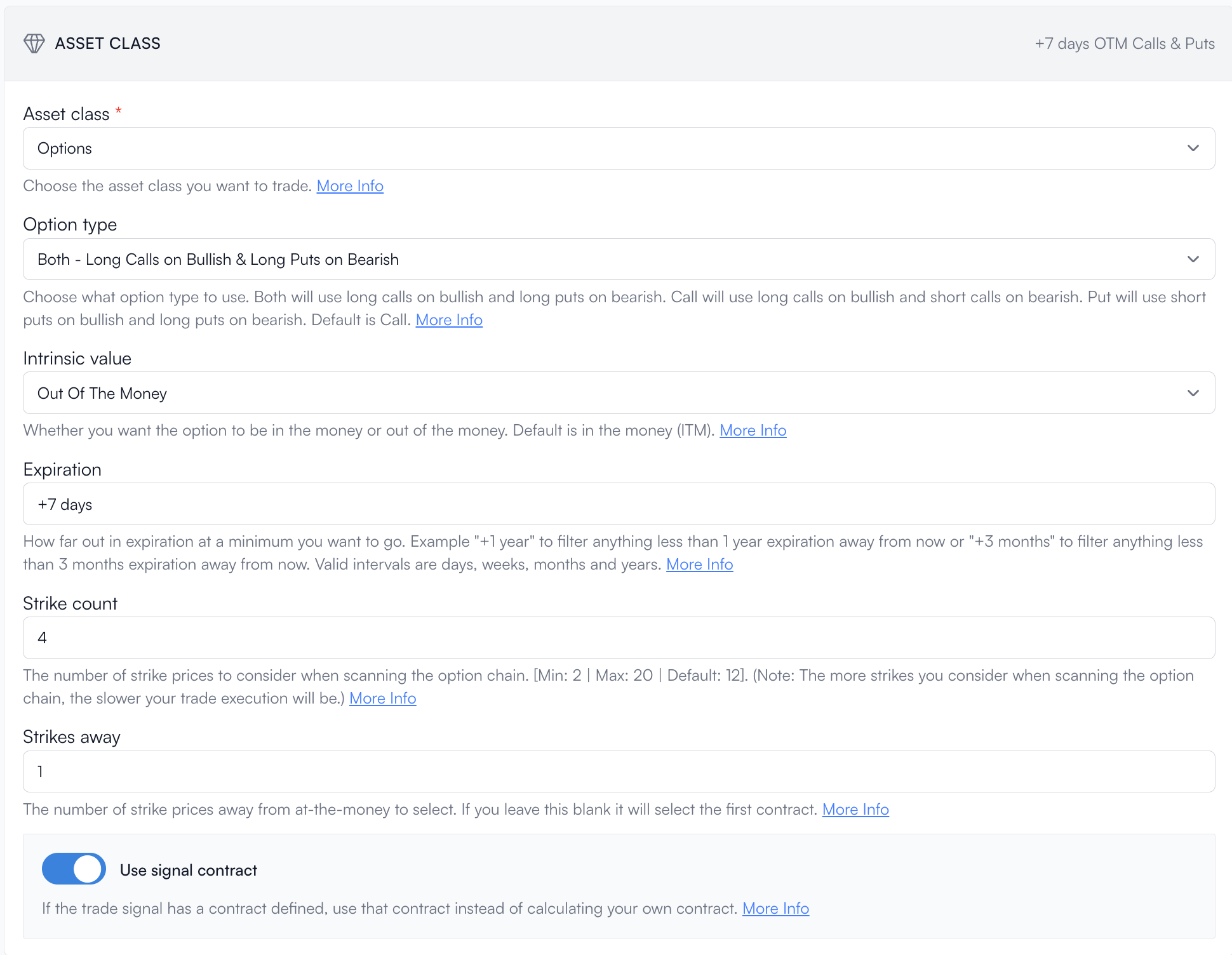
You are able to control the option chain scanning functionality from webhooks. Here is an example:
{
    "ticker": "AAPL",
    "action": "buy",
    "expiration": "+6 months",
    "instrinsicValue": "itm",
    "optionType": "both",
    "strikesAway": 3
}
Or send the exact contract you want to trade instead of using the option chain scanning functionality:
{
    "ticker": "AAPL",
    "action": "buy",
    "expiration": "2023-01-20",
    "optionType": "call",
    "strikePrice": 325
}
Expiration Series Filters
When you configure option chain scanning (in subscription settings or the webhook signal), you can narrow which expirations are considered by series type. TradersPost uses the same filter names on every supported broker:
| Filter | Meaning |
|---|---|
| 0DTE | Expires on the current exchange trading date |
| Daily | Short-term expiration on Monday–Thursday (not a standard monthly) |
| Weekly | Friday short-term expiration that is not the standard monthly cycle day (typically not the third Friday of the month) |
| Monthly | Standard monthly cycle expiration (typically the third Friday of the month) |
| End of Month | Last trading day of a non-quarter-ending month |
| Quarterly | Last trading day of a quarter-ending month (March, June, September, December) |
| LEAPS | Expirations about one year or more out |
0DTE and LEAPS can overlap the other filters. For example, a contract can be both 0DTE and Daily.
What To Expect From Each Filter
- Weekly — Near-term Friday expirations outside the standard monthly cycle. Liquid names such as
SPYandQQQusually have several of these listed. - Monthly — The regular monthly expirations further out on the cycle.
- Daily — Monday–Thursday short-dated listings. Highly liquid underlyings often have these; many individual stocks do not. An empty Daily list (for example on a less actively listed name) means no matching dates, not a broken connection.
- End of Month / Quarterly — Month-end and quarter-end style expirations when the broker lists them. Some stocks have few or none under Quarterly.
- 0DTE — Only today’s expiration, when one exists.
- LEAPS — Longer-dated contracts about a year or more out.
Broker Differences
For stock and ETF options, supported brokers generally agree on which dates fall under each filter. Small differences can still appear when a broker lists an extra short-dated expiration or classifies a date differently. TradersPost keeps the meaning of each filter consistent; it does not force every broker’s date list to be identical.
For cash-settled index underlyings such as SPX — where monthly and weekly-style contracts can use different roots on the same Friday — see Index Options Trading.
Webhook Signals
It's easy to send signals to TradersPost using Webhooks from platforms like TradingView or TrendSpider. You just need to send JSON like the following to the webhook URL you create within TradersPost.
Inside of TradersPost when setting up a strategy you can configure what kind of option contracts to buy when you receive a signal.
The default Both option type buys long calls on action=buy and long puts on action=sell. Put behavior also depends on the Invert puts strategy setting when option type is Puts or when you send an explicit put contract. See Webhooks for details.
Full Signal Example
You can optionally include a quantity in the signal that can then be used in the calculated orders that we send to your broker. Here is a full example signal.
{
    "ticker": "SQ",
    "action": "buy",
    "quantity": 5
}
If you configure your strategy subscription to use limit orders and to use the signal quantity, then you will get a Buy To Open Limit order for 5 contracts. If you don’t select entry market or exit market, then we will submit a limit order with the midpoint price.