See what's new without leaving the app
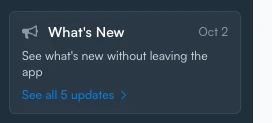 You asked us to make it easier to keep up with updates to TradersPost. Release notes used to live on a page you had to go looking for. Now they come to you. A What's New card in the sidebar shows the newest release date and headline, and clicking it steps through every update from that release. The first time you open your dashboard after a release, a What's New at TradersPost window opens on its own and walks through that release's updates, with a link to the full release notes. It appears once per release for your account, and the sidebar card keeps the same updates one click away.
A redesigned Change Plan window
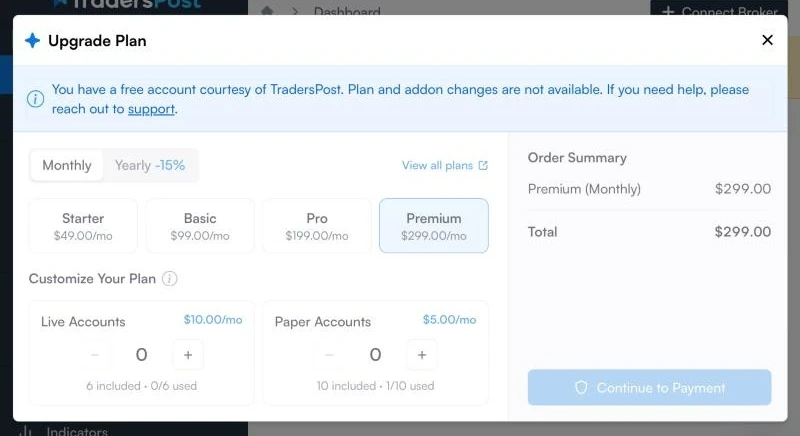
Changing your plan or add-ons used to leave you guessing what the charge would be. The redesigned Change Plan window shows what you will pay today before you confirm. Choose a plan, then pay with a saved payment method or add a new one. If your bank asks you to verify a payment, that happens in the same window. Upgrades are prorated and billed when you confirm the change. Downgrades take effect at the end of your billing period. When you upgrade, including from a free account, choose Have a coupon? in the order summary.
Invoices now explain the credits applied, the amount due, and what changed. If a payment is interrupted, open the invoice and choose Complete Payment to finish it, or Cancel Payment to discard the change.
See the billing FAQ for how upgrades are billed.
Choose whether trades wait for each other
When two signals for the same broker account arrive at the same moment, each can plan its order from the same starting position, and the result is not what either signal intended. The new Enable trade locking option in the Retry settings of strategies and subscriptions fixes that. With it on, TradersPost runs one trade at a time for the same broker account and symbol, so each trade plans from the position the one before it left behind. With it off, trades run as soon as they arrive without waiting on each other.
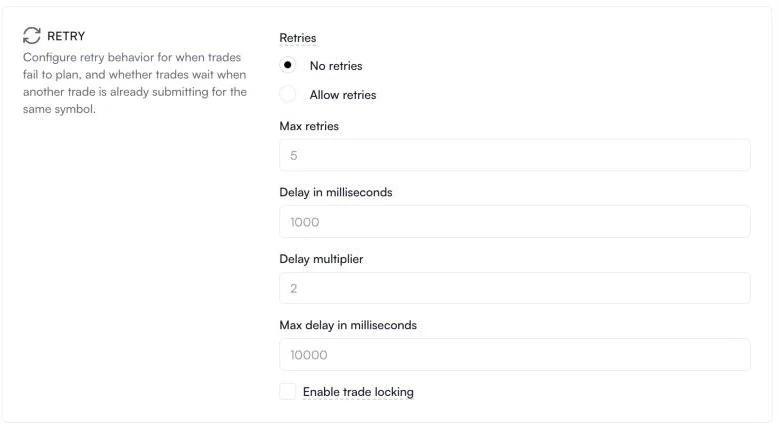
Strategies and subscriptions you already have keep trade locking on. New strategies start with it off. New subscriptions start with it on, unless they copy their strategy's defaults. For brokers that take one order at a time, such as Interactive Brokers, a subscription can't turn locking off, and the lock covers every symbol on that connection. Each trade's settings show whether locking was on, and the strategy, subscription, and trade CSV exports include an Enable Trade Locking column.
See Enable trade locking in the reference manual.
Resize no longer sends orders your broker would reject
Sending the same resize target twice could end in a failed trade. A position can sit just off its target when a fee is taken in kind, for example holding 0.029955 ETH after buying 0.03, so the second resize sent a tiny order the broker would reject. TradersPost no longer sends it. The trade ends as Rejected with a message that names the gap, the target, and the smallest order the broker accepts, and your take-profit and stop-loss orders are left in place. Alpaca also requires crypto orders on USD pairs to be worth at least $10, and resize checks that too. A resize to 0 still closes the position.
The check applies to brokers that publish a minimum order size or value, which is mostly crypto. See Webhooks for how resize works, and the reference manual entries for the minimum order size and minimum order value messages.
Enhancements and fixes
- When a
resizeconflicts with thesentimentyou sent, the trade now keeps showing which sentiment it needed when you view it later.